p5-wrapper / react Goto Github PK
View Code? Open in Web Editor NEWA wrapper component that allows you to utilise P5 sketches within React apps.
Home Page: https://P5-wrapper.github.io/react/
License: MIT License
A wrapper component that allows you to utilise P5 sketches within React apps.
Home Page: https://P5-wrapper.github.io/react/
License: MIT License


![dependabot[bot] avatar](https://avatars.githubusercontent.com/in/29110?v=4 "dependabot[bot]")


![renovate[bot] avatar](https://avatars.githubusercontent.com/in/2740?v=4 "renovate[bot]")





The canvas is wrapped in unmarked div tags.
<div>
  <canvas>
</div>
Is there a way to apply styles to the canvas so I can manipulate it as a background of another element (position: 'absolute', top: 0, left: 0, zIndex: -1)? So far, my react styling does nothing but push the canvas down.
Additional info, I would like to be able to do this without needing an external css file. So far, I have the and it would be great if I can somehow manipulate it's zIndex, position, and all other typical canvas styles.
I output the incoming function inside the p5, found no p5.Vector,can you fix it
Is there a way to load p5 plugins using this wrapper?
Hello there,
i have a sketch function ( same as the one on the first example) and i want to pass some props to this function and i cant understand how.
So i have the index.js file which is something like this
`import React, { Component } from 'react';
import logo from './logo.svg';
import './App.css';
import P5Wrapper from 'react-p5-wrapper';
import sketch from './demo';
class App extends Component {
state = {
x: undefined,
y: undefined
}
onMove(e){
    this.setState({x:e.screenX, y: e.screenY})
}


render() {
return (
  <div className="App" onMouseMove={(e) => this.onMove(e)}>
    <header className="App-header">
      <img src={logo} className="App-logo" alt="logo" />
      <h1 className="App-title">Welcome to React</h1>
    </header>
    <p className="App-intro">
        <P5Wrapper sketch={sketch} />
    </p>
  </div>
);
}
}
export default App;`
and my sketch function is this
`
export default function sketch (p) {
let rotation = 0;
p.setup = function () {
    p.createCanvas(800, 800, p.WEBGL);
    p.angleMode('DEGREES');
};

p.myCustomRedrawAccordingToNewPropsHandler = function (props) {
    if (props.rotation){
        rotation = props.rotation * Math.PI / 180;
    }
};

p.draw = function () {
    p.background(100);
    p.stroke(255);
    p.push();
    p.rotateX(rotation);
   // p.box(100);
    p.fill(255);
   // p.rotate(10);
    p.translate(props.x,props.y);
    p.rect(0,0,100,50);
    p.pop();
};
};`
now as you can see i want to pass down x and y to my sketch, but i can't figure out how
can you support the typescript ?
Will be fixed with JedWatson/react-component-gulp-tasks#30 if it ever gets merged.
I have a simple App that switches between sketches on click:
code: https://github.com/michaelghinrichs/i-hope-this-art
example: https://michaelghinrichs.github.io/i-hope-this-art/
I have started to notice if i switch between sketches (click the screen 10 times thus changing the current sketch 10 times) the canvas starts to get really really slow... try it out on the site and notice that the drawings render very slowly in a direct correlation to how many times you have switched sketches.
Currently, i just pass a different function to sketch, is that a bad practice? Should each sketch be it's own p5 wrapper?
Here is what my code looks like:
import React, { Component } from 'react';
import P5Wrapper from 'react-p5-wrapper';
import doubleCircles from './drawings/doubleCircles';
import contours from './drawings/contours';
import flower from './drawings/flower';
import './App.css';

 class App extends Component {
   constructor(props) {
     super(props);
     this.state = {
       sketches: [ contours, flower, doubleCircles ],
       active: flower,
     }
   }

   switchSketch = () => {
     const current = this.state.active;
     const nextSketchs = this.state.sketches.filter((sketch) => {
       return sketch.name !== current.name;
     });
     const newSketchs = nextSketchs.concat(current);
     this.setState({
       active: nextSketchs[0],
       sketches: newSketchs,
     });
   }

   render() {
     return (
       <div className="App" onClick={this.switchSketch}>
         <P5Wrapper sketch={this.state.active} />
       </div>
     );
   }
 }
Any idea what I am doing wrong? Should I unmount and remount the P5Wrapper?
Please, do something with componentWillUnmount to stop the sketch. Without this, the sketch still working and invoking prop functions even though it was destroyed.
Hey!
I am using react-p5-wrapper in a web app called TruSat, thank you for building it!
https://trusat.org/catalog/priorities
The little badges in the table rows are rendered with help of your wrapper. The number of the sat is used to conditionally render a different colored badge for each.
I just found a weird bug whereby the app crashes (sometimes) when I click on a users name in the table to navigate to their profile page.
When on the link I shared above, try clicking on the user named SolarLyra in the table (last column on right) and you will see that their profile page doesn't load - but it does when you refresh the page. If you can't replicate the bug, try repeating this process a couple of times by going back to the catalog page and click the username again in the table.
When I check the console, I see the following error:
TypeError: Cannot read property 'remove' of null
    at t.componentWillUnmount
And upon further inspection, it originates to here-
  P5Wrapper.prototype.componentWillUnmount = function () {
    this.state.canvas.remove();
  };
Any ideas what I can do on my end to help fix this bug?
Thanks so much in advance!
John.
I'm attempting to create a sketch file using your method but I'm getting this error:
Module not found: Can't resolve 'p5' in '/node_modules/react-p5-wrapper/dist'.
Do I need to create a browserfy build of p5 or something?
Please help!
Hi,
i'm trying to draw a rainfall.
If i do this on p5online editor it works, it creates a single rain drop that falls over the screen.
If i use this with p5wrapper it draws multiple drops one under the other every call of "draw" function.
Here's my sketch :
`import RainDrop from '../Models/RainDrop'
export default function sketch (p) {
const drop = new RainDrop(p)

p.setup = function () {
    p.createCanvas(window.innerWidth, window.innerHeight)
};

p.myCustomRedrawAccordingToNewPropsHandler = function (props) {
    console.log(props, 'custom thing')
};

p.draw = function () {
    drop.draw()
    drop.update()

};
};`
here's my RainDrop class
`export default class RainDrop {
constructor(p) {
    this.x = Math.floor(Math.random() * window.innerWidth) + 1
    //this.y = Math.floor(Math.random() * -500)
    this.y = 50
    this.speed = Math.floor(Math.random() * 10) + 1
    this.p = p
}

update = () => {
    this.y = this.y + 10//this.speed
    if(this.y > window.innerHeight) {
        this.y = Math.floor(Math.random() * -500)
    }
}

draw = () => {
    this.p.stroke(128,0,128)
    this.p.line(this.x, this.y, this.x, this.y + 5)
}
}`
and here's my simple App.js :
`import React from 'react';
import logo from './logo.svg';
import './App.css';
import P5Wrapper from 'react-p5-wrapper'
import MouseSketch from './Sketches/MouseSketch'
import RainingSketch from './Sketches/RainingSketch'
   function App() {
       return (
         <div className="App">
            <P5Wrapper sketch={RainingSketch} />
         </div>
     );
     }

      export default App;`
Currently I've this in my Sketch.tsx
p.myCustomRedrawAccordingToNewPropsHandler = function(props) { if (props.testValue) { testValue = props.testValue } }
Let's say I've a vanilla .js class file where I use it to generate particles.
How can I pass the testValue over to the .js file?
I tried to pass it into the constructor but it doesn't work?
It gives me "undefined".
How can I return the props value in p.myCustomRedrawAccordingToNewPropsHandler and store it somewhere else where I can reuse? It works in draw() but not setup().
This happens because p5 is imported before window is defined (e.g. server-side rendering and build step). By moving the require("p5") line into componentDidMount this can be resolved.
I updated the library, but now I get an error ReferenceError: p5 is not defined:

I've created a prototype that allows the user to download a file to their local machine once they're done with manipulation.
Essentially I'm trying to re-create this by going through this tutorial in React https://www.youtube.com/watch?v=JWsKay58Z2g&list=PLRqwX-V7Uu6YPSwT06y_AEYTqIwbeam3y&index=12
However in Chrome I'm getting this error saying...
Download is disallowed. The frame initiating or instantiating the download is sandboxed, but the flag ‘allow-downloads’ is not set. See https://www.chromestatus.com/feature/5706745674465280 for more details.
After Google, it seems this is something new they just released. However we can opt in.
I wonder if anyone know how to set allow-downloads in my sandbox attribute?
Sorry to bother, I'm trying to use you super-helpful component BUT when I use p5 costants like PI or HALF_PI I recive un error of undefined am I the only? there is a way to fix this?
When running this script on p5 js's sandbox it's working really fine
When trying to use it inside react i get : Expected an assignment or function call and instead saw an expression no-unused-expressions
I checked previous questions and found out that most of the problems are syntax ones due to not using brackets or semicolons . I did all the good syntax practices but didn't get to make it function
Here is my sketch code on react :
export default function sketch(p){
      var t;
      var canvas ;
      var w = window.innerWidth;
      var h = window.innerHeight;
      var x , y , d , T;
      p.setup=()=>{

        // put setup code here
        t=0;

      }
      p.draw = () => {
        canvas =p.createCanvas(w-50, h-50);
        canvas.style('display','block');

        var x_center = (p.windowWidth - w) / 2;
        var y_center = (p.windowHeight - h) / 2;
        canvas.position(x_center, y_center);

       t += .01;

        for (var j = 2; x = y = j--;){
          for (var i = w; d = p.noise(t - i / 99) * 3, i--; x += Math.cos(d) * 6, y += Math.sin(d) * 6){
               j ? i - w / 2 || ( T = p.translate)(-x, -y) : p.push() + T(x + w / 2, y + w / 2) + p.rotate(d + Math.PI / 4) + p.line(-600, 100, 600, 100) + p.pop(i % 100 || p.scale(80));

          }
        }
      }

      window.onresize = function() {
        // assigns new values for width and height variables
        w = window.innerWidth;
        h = window.innerHeight;
        canvas.size(w,h);
      }
}
Hi, I'm working on a p5 game that requires p5.play library. Since it's not in the ecosystem, I dragged the p5.play into the p5 node_module and use 'import "p5/lib/addons/p5.play"; to import it. However, I still can't use the p5.play function. Can anyone help me solve it?
Thanks!
Update: I forgot to import * as p5 from 'p5' - it also only works for react-p5-wrapper but not react-p5 somehow :(
The link in the README goes to a 404 page: "There isn't a GitHub Pages site here."
http://nerocor.github.io/react-p5-wrapper/
Using https also gives a 404.
i can only use version 0.0.4. when i try to use .5 it says "version not found"
Can you make this a PureComponent instead of a Component? I've had a little play with it as a purecomponent, and it works all the same, but it doesn't re-rendering unnecessarily. I was having issues when my parent element updated, as it would cause all of its child elements to re-render (which, for p5, means re-initialising the sketch). I would make a pull request for this but it seems silly for just one word.
Thanks, Lewis
So in my Sketch file, instead of
p5.keyPressed = () => {
...
...
bunch of chaining setTimeout (..., 1000)
}
Can I do,
async p5.keyPressed = () => {
...
...
await delay(1000)
}
What's the right syntax to do this?
Using React 16.13.1
npm 6.14.4
Node v12.16.0
P5 1.0.0
I've created a component to place a sketch in, which is displaying a single frame of the sketch, but that's it. The animation of the included sketches based on the "rotation" property isn't updating.
I'm using both example sketchs (sketch1.js and sketch2.js, as well as the example in the README file -- all have the same behavior.
App.js:
import React from 'react';
import BackgroundAnimation from './BackgroundAnimation';
function App() {
return (
< BackgroundAnimation />
)
}
export default App;
`
BackgroundAnimation.js:
`
import React from 'react';
import P5Wrapper from 'react-p5-wrapper';
import {default as sketch1} from './sketches/sketch1';
const BackgroundAnimation = () => {
let rotation = 10;
return (
    <P5Wrapper sketch={sketch2} rotation={rotation} />
)
}
export default BackgroundAnimation;
`
I've added some console.log(), which appear to never be called (Not seeing anything in the console).
I'm still a little new to React. I'm guessing I have to add something to one of the life cycle functions? Maybe I can't use functional components and need to explicitly make it a class component? Are there any hooks I could use? I'm not seeing much documentation.
Any help would be greatly appreciated.
Thanks in advance.
Hi, first of all I'd like to say this is the best p5 react wrapper so far! @and-who
I'm new to all these, so do give me some guidance here.
I'm trying to create create a simple particle system here.
My particle class
`
import p5 from "p5";
export default class Particle {
constructor() {
this.x = random(width);
this.y = random(height);
this.diameter = random(10, 30);
this.speed = 1;
}
move() {
this.x += random(-this.speed, this.speed);
this.y += random(-this.speed, this.speed);
}
display() {
ellipse(this.x, this.y, this.diameter, this.diameter);
}
}
`
My p5 sketch
`
import p5 from "p5";
import Particle from "./Particle";
global.p5 = p5;
export default function sketch(p) {
let bug1;
let bug2;
p.setup = () => {
p.createCanvas(710, 400);
bug1 = new Particle();
bug2 = new Particle();
};
p.draw = () => {
p.background(50, 89, 100);
bug1.move();
bug1.display();
bug2.move();
bug2.display();
};
}
`
But I can't seem to get it working...
Hello,
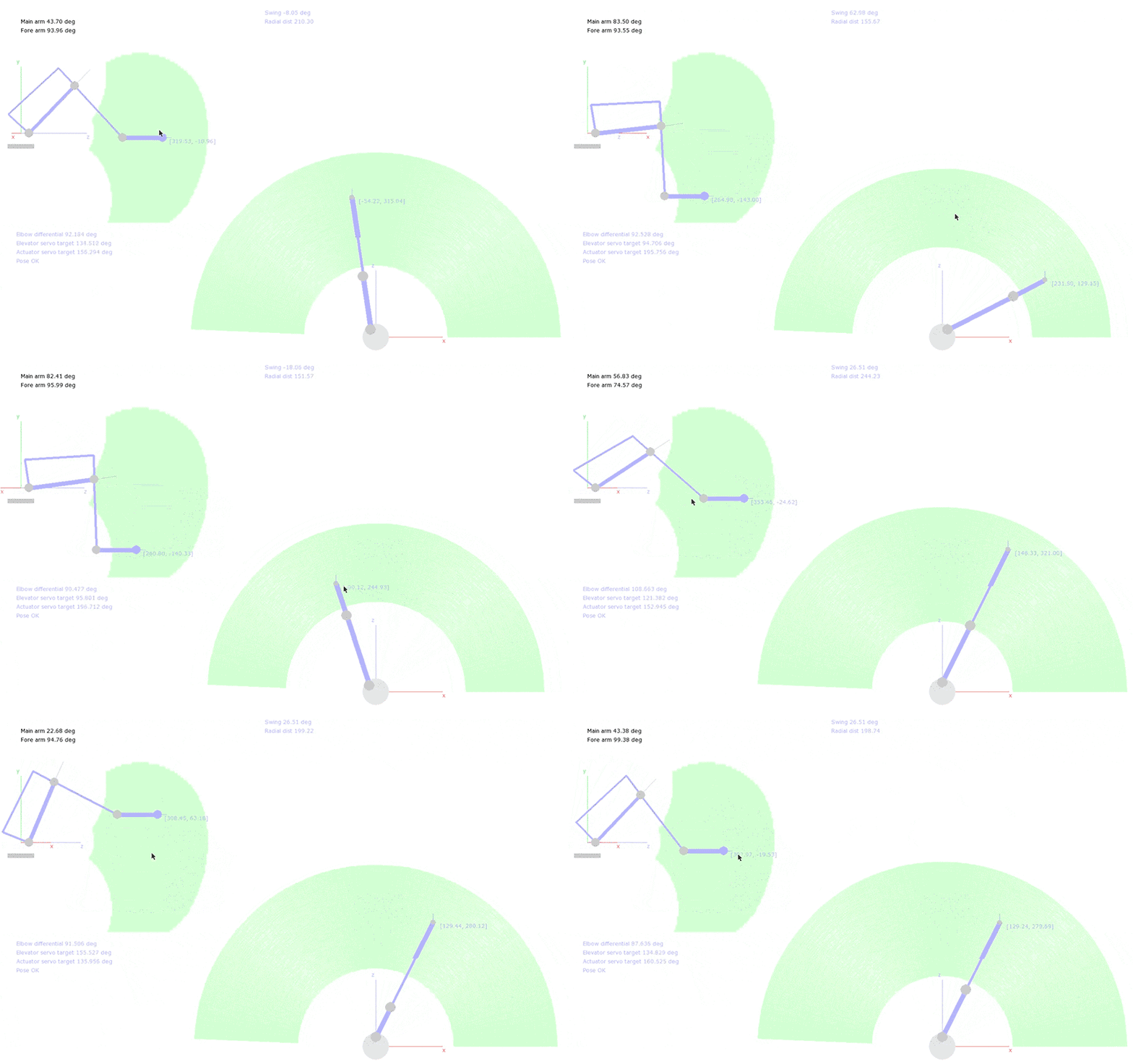
I'm part of my robotics club at my university and am tasked with finding a way to provide a way to control our robotic arm. I've been looking at other JS libraries like EaselJS and Paper.js, etc. But I wanted to know if it would be possible to mimic the interactivity with P5.js & React.js as seen in this gif: http://www.alistairwick.com/assets/images/robot/ik.gif
Anyways, I just need to be able to create an interactive way to provide 1 to 1 arm control for now. And if I figure things out for inverse kinematics than the setup of the controls should be pretty similar. We can assume the robotic arm I'm working on is a 3 degree of freedom arm as seen in the gif.
Thanks so much!
Was wondering if anyone else was running into this problem with Gatsby.js. I am getting a "Window is not defined error" when trying to build with p5 and react-p5-wrapper. It seems like the "window" is actually in the p5.js file. I can currently run in on the local server, just can't build the Gatsby app.
I have followed instructions as you said, I am novice currently learning react js but I know processing and p5.
I have implement a visualizer in web app
so here is my minimal code.
import React, { Component } from 'react';
import {DropdownButton, MenuItem, Button, Container, Row, Col} from 'react-bootstrap';
import { Line } from "react-chartjs";
import logo from './logo.svg';
import './App.css';
import P5Wrapper from 'react-p5-wrapper';
class App extends Component {
  render() {
    var time="Evening";
    var userName="Shirish";
    return (
      <div className="App">
        <P5Wrapper sketch={sketch} />
      </div>
    );
  }
}
export default function sketch (p) {
  let rotation = 0;

  p.setup = function () {
    p.createCanvas(600, 400, p.WEBGL);
  };

  p.myCustomRedrawAccordingToNewPropsHandler = function (props) {
    if (props.rotation){
      rotation = props.rotation * Math.PI / 180;
    }
  };

  p.draw = function () {
    p.background(100);
    p.noStroke();
    p.push();
    p.rotateY(rotation);
    p.box(100);
    p.pop();
  };
};


export default App;
I get
./src/App.js
Syntax error: Only one default export allowed per module. (182:0)
I think I am not sure of this function. where should it reside ? in main app file? I also think this is no in same langauge also.
When I try to run React hooks, I get a bunch of errors:
Uncaught Error: Invalid hook call. Hooks can only be called inside of the body of a function component. This could happen for one of the following reasons:
1. You might have mismatching versions of React and the renderer (such as React DOM)
2. You might be breaking the Rules of Hooks
3. You might have more than one copy of React in the same app
See https://fb.me/react-invalid-hook-call for tips about how to debug and fix this problem.
I'm trying to use React hooks within here:
export default function sketch(p5) {
...
}
There are a few p5 tutorials out there that have additional .js files they use to import in for the p5 experience.
I'm trying to follow this tutorial here: https://thecodingtrain.com/CodingChallenges/115-snake-game-redux.html
Re-creating the exact same thing in React by copy-pasting the code.
But to get it to work with React-p5-wrapper and React in general seems hard?
Here is my demo code.
https://codesandbox.io/s/immutable-wave-z20tv?file=/src/App.js
UPDATE: I think I manage to fix it but I'm getting a ton of console errors which I don't quite understand.
Module not found: Can't resolve 'p5' in '..\node_modules\react-p5-wrapper\dist'
What am I doing wrong?
I tried to capture video with my webcam but react-p5-wrapper not found function createCaptrue(). Or I miss something?
Currently only the basic p5 is wrapped.
It is not clear how to include the libraries that sit in "p5\lib\addons".
Question: does the react-p5-wrapper use the minified version of p5.js (p5.min.js) ?
And if not, is there a way to force it to ?
I get this warning when installing into React v15.4.2:
├── UNMET PEER DEPENDENCY [email protected]
└── [email protected]

npm WARN [email protected] requires a peer of react@^0.14.0 but none was installed.
My package.json looks like this:
{
  /* stuff */

  "dependencies": {
    "react": "15.4.2",
    /* everything else */
  }
}
Not sure the ethics of submitting an issue. (let me know!)
But since the previous one has been closed, instead of tagging on questions there, I thought I should create a new one.
@jamesrweb I'm trying to get this working, just want to understand the step-by-step way of getting this working.
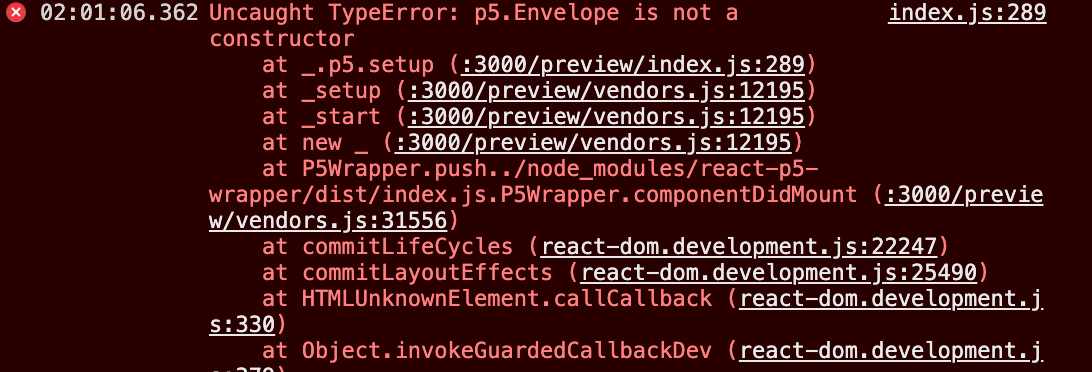
npm install --save @types/p5import * as p5 from "p5" and import "p5/lib/addons/p5.sound" in my Sketch file and use it straightaway?My code, following this tutorial: https://www.youtube.com/watch?v=8HEgeAbYphA&feature=emb_logo
export default function sketch(p5) {
    p5.setup = () => {
        p5.createCanvas(400, 400)

        env = new p5.Envelope()
        env.setADSR(0.05, 0.1, 0.5, 1)
        env.setRange(1.2, 0)

        wave = new p5.Oscillator()
        wave.setType("sine")
        wave.start()
        wave.freq(440)
        wave.amp(env)
...
I tried them and I get the errors saying:
Originally posted by @vennsoh in #11 (comment)
It would be nice to be able to pass a className prop to style the wrapper div directly.
I tried to change the sketch during a state rerender, but it keeps rendering the initial sketch. Any workarounds to change the sketch after the component has already been mounted?
Dependencies:
    "react": "^16.2.0",
    "react-dom": "^16.2.0",
    "react-p5-wrapper": "^0.0.4",
    "react-scripts": "1.1.1",
Error message:
TypeError: this.curFillShader.attributes.aNormal is undefined
./node_modules/p5/lib/p5.js/</</<[105]</p5.RendererGL.prototype.createBuffers
node_modules/p5/lib/p5.js:68869

  68866 | // allocate space for normals
  68867 | this._bindBuffer(this.gHash[gId].normalBuffer, gl.ARRAY_BUFFER,
  68868 |   this._vToNArray(obj.vertexNormals), Float32Array, gl.STATIC_DRAW);
> 68869 | this.curFillShader.enableAttrib(this.curFillShader.attributes.aNormal.location,
  68870 |   3, gl.FLOAT, false, 0, 0);
  68871 | // tex coords
  68872 | this._bindBuffer(this.gHash[gId].uvBuffer, gl.ARRAY_BUFFER,
./node_modules/p5/lib/p5.js/</</<[105]</p5.RendererGL.prototype.createBuffers
node_modules/p5/lib/p5.js:68869

  68866 | // allocate space for normals
  68867 | this._bindBuffer(this.gHash[gId].normalBuffer, gl.ARRAY_BUFFER,
  68868 |   this._vToNArray(obj.vertexNormals), Float32Array, gl.STATIC_DRAW);
> 68869 | this.curFillShader.enableAttrib(this.curFillShader.attributes.aNormal.location,
  68870 |   3, gl.FLOAT, false, 0, 0);
  68871 | // tex coords
  68872 | this._bindBuffer(this.gHash[gId].uvBuffer, gl.ARRAY_BUFFER,

./node_modules/p5/lib/p5.js/</</<[109]</p5.prototype.box
node_modules/p5/lib/p5.js:70681

  70678 |   //initialize our geometry buffer with
  70679 |   //the key val pair:
  70680 |   //geometry Id, Geom object
> 70681 |   this._renderer.createBuffers(gId, boxGeom);
  70682 | }
  70683 | this._renderer.drawBuffers(gId);
  70684 |
sketch/p.draw
src/sketches/default.js:22

  19 | p.translate(-150, 100);
  20 | p.rotateY(rotation);
  21 | p.rotateX(-0.9);
> 22 | p.box(100);
  23 | p.pop();
  24 |
  25 | p.noFill();
I have been trying everything I could think of to get the canvas to display text. I have changed the location many times and the colors. I cannot figure out why it isn't working. I can display a rectangle and ellipse, but for some reason text won't show. I will provide any more information necessary. Thank you for your help.
p.setup = function () {
p.createCanvas(window.innerWidth, window.innerHeight*.75, p.WEBGL);
p.background(100);
p.strokeWeight(1);
p.stroke(color);
p.cursor(p.CROSS);
};
p.draw = function () {
p.fill(255);
p.textSize(32);
p.text('Sample Text', 0, 0);
}
Hi,
I just imported the react-p5-wrapper into my website and suddenly the bundle increases by 1mb. Is that normal? It can not be that this bundle is that huge after production.
Version: webpack 4.27.1
I could be doing something wrong here, but how could I pass images to p5 here?
Component
const myImage = require('./assets/image.png');

render() (
    <P5Wrapper sketch={sketch} image={myImage}/>
)
sketch.js
let image;

p.myCustomRedrawAccordingToNewPropsHandler = function(props) {
    if(props.image) {
        image = props.image;
    }
}

p.draw = function() {
    p.loadImage(image); // p5.js says: It looks like there was a problem loading your image. Try checking if the file path [/static/media/image_1.01b571ff.png] is correct...
}If I'm trying to use static method like p5.Vector.random2D() https://p5js.org/reference/#/p5.Vector/random2D
How can I use it?
import p5 from "p5" export default function sketch(p) { p.setup = () => { } p.draw = () => { p.background(240) let v1 = p5.Vector.random2D() } }
Are there any future plans to refactor the code to use hooks and all the latest React goodness? I found one here which looks very promising but it's way to complex for a novice like me. https://discourse.processing.org/t/using-react-with-p5-js-es6-support/
Hi there, I'm wondering if there's a way to pass a value from the p5 Sketch file back into React? For example. I want to keep track of the label value generated in p5 Sketch and use that somewhere later. How can I store that value globally?
export default function sketch(p5) {
    const [store, setStore] = useStore()

    function modelReady() {
        console.log("Model is ready!!!")
        mobilenet.predict(gotResults)
    }

    function gotResults(error, results) {
        if (error) {
            console.error(error)
        } else {
            **label = results[0].label**
            mobilenet.predict(gotResults)
        }
    }
Hi. I include import "p5/lib/addons/p5.sound" in sketch.js and I get a compile error Line 21: 'loadSound' is not defined no-undef.
Line 21 is: let song = loadSound("/src/test.ogg");
Is there anything I did wrong?
Thank you
Can I also pass a function as a property let's say something like this:
<P5Wrapper sketch={sketch} action={actionFunction} />

//sketch
export function sketch(P) {
  const p = P;

  p.setup = function (props) {
    p.createCanvas(width, height);
   props.actionFunction();
  };

  p.draw = function () {
    }
  };
}
I've tried and failed. Is it possible to do this?
When using a sketch in a REACT Webapp (via react-p5-wrapper), when I try to use:
p.imageMode(CENTER)
I get the error:
'CENTER' is not defined
Any suggestions?
Unfortunately p5 won't work with isomorphic react apps due to window and documentrequirements. Any thoughts?
The myCustomRedrawAccordingToNewPropsHandler works fine for taking new property values which have been changed, but it doesn't take their initial values. E.g. with the README example, rotation has been set to 0 initially from within the sketch, instead of via the <P5Wrapper sketch={sketch} rotation={rotation}/> code.
Is there a hack for this? Or does it need to be implemented? I find that being able to send values to the sketch (and have them be received from the start) is extremely important when wanting to dynamically allocate config values to sketches, like the urls of source data.
Good morning my friends
How to use the Vector method, see that in the sketch argument an object is returned and not the p5 function that has the Vector method
= This Work
import React from "react";
import ReactDOM from "react-dom";
import P5Wrapper from "react-p5-wrapper";

export function sketch(p5) {
//   let v1 = p5.Vector.random2D();
p5.setup = () => {
    console.log("p.setup");
};
p5.draw = () => {
    console.log("p.draw");
    p5.background(240);
};
}

const App = () => {
return (
    <>
    <div>App Hello World!</div>{" "}
    <div id="container_3d" className="center">
        <P5Wrapper sketch={sketch} />
    </div>
    </>
);
};

ReactDOM.render(<App />, document.getElementById("root"));
= This Not Work
import React from "react";
import ReactDOM from "react-dom";
import P5Wrapper from "react-p5-wrapper";

export function sketch(p5) {
console.log("typeof p5", typeof p5); // Not is a Function ???
console.log("p5", p5);
let v1 = p5.Vector.random2D(); // Error: index.js:6 Uncaught TypeError: Cannot read property 'random2D' of undefined
p5.setup = () => {
    console.log("p.setup");
};
p5.draw = () => {
    console.log("p.draw");
    p5.background(240);
};
}

const App = () => {
return (
    <>
    <div>App Hello World!</div>{" "}
    <div id="container_3d" className="center">
        <P5Wrapper sketch={sketch} />
    </div>
    </>
);
};

ReactDOM.render(<App />, document.getElementById("root"));


 React
React
A declarative, efficient, and flexible JavaScript library for building user interfaces.
🖖 Vue.js is a progressive, incrementally-adoptable JavaScript framework for building UI on the web.
 Typescript
TypeScript is a superset of JavaScript that compiles to clean JavaScript output.
An Open Source Machine Learning Framework for Everyone
 Django
The Web framework for perfectionists with deadlines.
 Laravel
A PHP framework for web artisans
Bring data to life with SVG, Canvas and HTML. 📊📈🎉
JavaScript (JS) is a lightweight interpreted programming language with first-class functions.
Some thing interesting about web. New door for the world.
A server is a program made to process requests and deliver data to clients.
Machine learning is a way of modeling and interpreting data that allows a piece of software to respond intelligently.
Some thing interesting about visualization, use data art
Some thing interesting about game, make everyone happy.
 Facebook
We are working to build community through open source technology. NB: members must have two-factor auth.
 Microsoft
Open source projects and samples from Microsoft.
 Google
Google ❤️ Open Source for everyone.
 Alibaba
Alibaba Open Source for everyone
 D3
D3
Data-Driven Documents codes.
 Tencent
China tencent open source team.